
Data Model Guide
This guide explains how Lynx is structured so you can navigate the APIs, interpret responses, and understand how objects relate to each other.
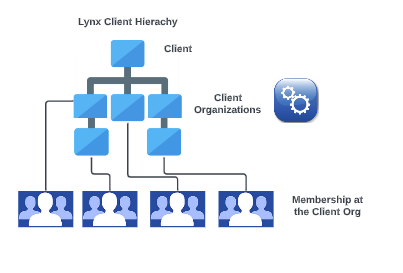
A Client Organization has:
- Products, a Program (card program structure), Card Packages, and Members
- A Member is enrolled in one or more Member Products, which create Member Accounts
- A Member can have one or more Cards and linked External Accounts
- Transactions, Orders, Claims, etc are events that occur against member accounts
Core Objects
Client
The top-level tenant in Lynx. Defines the banking partner relationship and base platform configuration.
- Lynx creates the Client during initial contract setup
- You will not interact with the Client object directly via API
- All Client Organizations belong to a single Client
Client Organization (clientOrg)
The operational entity where members are enrolled, products are configured, and cards are issued. This is the primary object you interact with.
For single-program clients: Lynx provisions one Client Organization during implementation. You enroll members into this org.
For multi-tenant clients (TPAs, platforms): Lynx provisions a parent Client Organization. You create child Client Organizations via API, one per employer group or sub-client.
| Field | Description |
|---|---|
| name | Unique identifier for the org (e.g., "Health_Plan_ABC") |
| status | Current state: New, App_Approved, Active, Suspended, Terminated |
| clientOrgParent | Reference to parent org (for child orgs in multi-tenant setup) |
| addresses | Business address |
| clientOrgContacts | Administrative contact information |
| clientOrgProducts | Products enabled for this org |
Child orgs:
- Inherit the parent's Program (card program structure)
- Can subscribe to a subset of parent's available products
- Can have their own card package or inherit parent's
- Are isolated from sibling orgs (Employer A cannot see Employer B's members)
Product
A benefit type that members can be enrolled into. Each product has its own enrollment requirements, funding model, and transaction behaviors.
Member-Owned Products
| Product | Description |
|---|---|
| HSA_01 | Health Savings Account — member-owned, KYC required, IRS reporting |
Plan-Owned Products
| Product | Description |
|---|---|
| FSA | Flexible Spending Account — healthcare expenses |
| LPFSA | Limited Purpose FSA — dental/vision only |
| HRA | Health Reimbursement Arrangement |
| ICHRA_PREM_ONLY | Individual Coverage HRA — premium payments only |
| ICHRA_PREM_PLUS | Individual Coverage HRA — premium + qualified expenses |
| OTC | Over-the-counter benefits (various configurations) |
| FOOD | Healthy food / grocery allowance |
| REWARDS | Rewards and incentives |
| INCENTIVE | Incentive programs |
Product Configuration
Each product has configuration that determines:
- Required enrollment fields
- Whether KYC is triggered
- Funding model (Good Faith, PBP, Member-Funded)
- Whether election amounts are required
- IRS contribution limits (for FSA, LPFSA, HSA)
Products are enabled at the Client Org level. A Client Org can have multiple products enabled (e.g., FSA + LPFSA + HRA).
Member
An individual enrolled in a Client Organization within the Lynx system.
| Field | Description |
|---|---|
| clientMemberId | Your unique identifier for this member |
| clientOrgName | The Client Org this member belongs to |
| memberDetails (object) | Demographic Information for the member (firstName, lastName, DOB etc) |
| addresses (object) | All associated addresses for a given member |
| phones (object) | All associated phone numbers for a given member |
| emails (object) | All associated e-mail addresses for a given member |
| status | NEW, ACTIVE |
Member Status Lifecycle:
| Status | Meaning |
|---|---|
| NEW | Enrollment submitted, KYC in progress (member-owned accounts only) |
| ACTIVE | Member record has been successfully created in Lynx system |
| INACTIVE | Member record is no longer active in Lynx system |
For plan-owned accounts (no KYC), members typically move directly to ACTIVE.
Member Product
The association between a member and a product. Created when you enroll a member into a product.
| Key Fields | Description |
|---|---|
| product | The product (HSA, FSA, OTC, etc.) |
| effectiveDate | When the product becomes active for this member |
| expirationDate | When the product is no longer effective for member |
| status | NEW, App_Approved, Account_Active, Denied, PendingReview |
Member Product Status Lifecycle:
| Status | Meaning |
|---|---|
| NEW | Enrollment submitted, pending KYC (member-owned) |
| PendingReview | KYC has been submitted awaiting decision |
| App_Approved | KYC passed, account being created |
| Account_Active | Account is open and funded, member can transact |
| Denied | KYC failed |
Note: A member can have multiple Member Products (e.g., HSA + FSA + OTC).
Member Account
The ledger that tracks a member's balance for a given product.
- For member-owned accounts (HSA): The Member Account is a real custodial account in the member's name.
- For plan-owned accounts (FSA, HRA, OTC, etc.): The Member Account is a sub-ledger within the Client Org's omnibus FBO account. The member sees "their" balance, but the actual funds are held in the FBO.
Member Card
A physical or virtual debit card issued to the member.
| Key Fields | Description |
|---|---|
| cardProxy | Unique card identifier (used in API calls) |
| cardNumber | The actual card number (only accessible via VGS for security) |
| cardType | Physical or Virtual |
| status | New, Active, Frozen, Closed |
| expirationDate | Card expiration |
Card Status Lifecycle:
| Status | Meaning |
|---|---|
| New | Card created, not yet activated |
| Active | Card is active and can be used |
| Frozen | Temporarily frozen (member or admin action) |
| Closed | Permanently closed |
| Lost/Stolen | Card has been marked lost/stolen (final status) |
Can a member have multiple cards?
Yes, depending on configuration:
- A member might have one card that accesses multiple purses (OTC + Food + Rewards)
- A member might have separate cards for incompatible products (FSA IIAS card + OTC filtered spend card)
- A member can have both physical and virtual cards
- A member can issue a dependent card (in dependents name) but same card information
Updated 6 months ago