
Enrollment Process
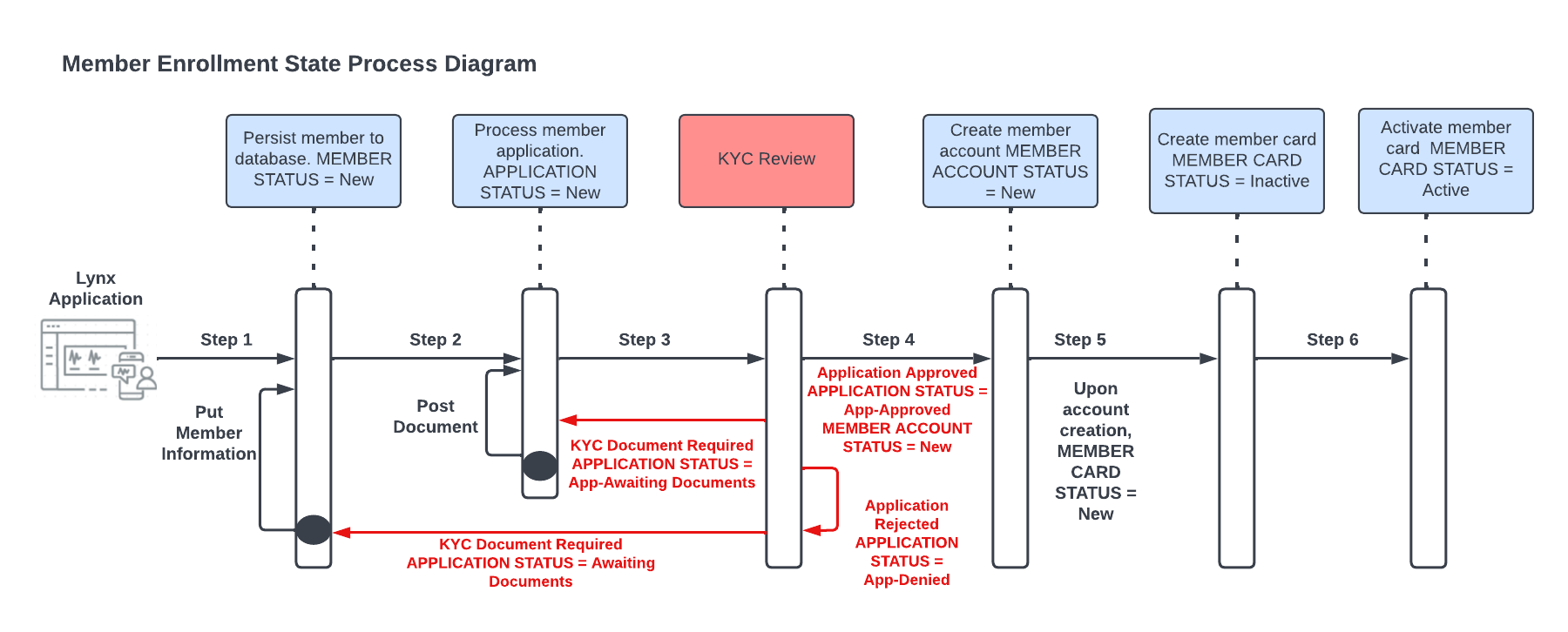
Lynx has simplified and streamlined the enrollment process to allow for quick onboarding of a client's members. The enrollment process includes:
Enrollment records received and validated: Once you transmit an enrollment record to Lynx either via API or batch file, the first action Lynx takes is to validate that all required data elements have been provided. The second action Lynx takes is to ensure the data contained in the record meets the data type, sizing and formatting requirements. The third action Lynx takes is to validate both idempotency and member information to prevent duplicate records from being generated. If you are using the batch enrollment process, automated messages will be returned to you identifying the file errors, including the specific records that have errors.
Submit and process member enrollment application: Once the enrollment record(s) have been validated, Lynx begins processing the product enrollments using the provided information. At this point in the enrollment process, a new member is created with a "NEW" status, a new member product is created with a "NEW" status, and a new member account is created with a "New" status in the Lynx system as Lynx reviews the application. Depending on the account type Lynx may need to complete the "Know Your Customer" (KYC) vetting in order to adhere with government regulation [More about this below]. The member’s product enrollment status is updated based on the application review.
Create the product account: After the application is approved, the member account is established. The created account is established based on the enrollment effective date, the client organization configuration and regulatory requirements. The account is now active for transactions.
Create the card: Following the account creation Lynx will generate a virtual or physical card for the account depending on your configuration. Virtual cards will be transmitted to the member electronically. Physical cards will be printed according to your card design and distributed to member via USPS.
Member Status
| Status | Definition |
|---|---|
| NEW | Initial state when KYC is required; cannot be targeted via API update |
| Active | Set when KYC passes or isn't required |
| Inactive | KYC denied, member transfer, or manual deactivation |
Member Product Status
Note: Member Product status may not be updated via an API.
| Status | Definition |
|---|---|
| NEW | A new enrollment has been submitted for a product |
| App_Pending | KYC application submitted, not yet reviewed |
| App_Pending_Review | This indicates some of the information on the KYC application requires a closer look by Lynx due to a potential for higher risk fraud. |
| App_Awaiting_Documents | This indicates that some additional documentation is needed from the member to help validate their identity. |
| App_Approved | KYC application approved, but the product is not yet active |
| App_Denied | This is a final status that is applied if an account cannot be established due to KYC. |
| Failed | Processing failure |
| Account_Active | Product is fully active |
| Inactive | Product is deactivated |
| Document_Approved | Requested KYC documentation has been provided and approved after review |
| Document_Rejected | Requested KYC documentation has been provided and rejected after review |
Member Account Status
Note: Using the PATCH Update Member Account Status API, if an account is Account_Active, it may be frozen or closed, and if an account is Frozen, it may be reactivated. If an account is Closed, it may not be reopened.
| Status | Definition |
|---|---|
| New | Account setup is in progress |
| Account_Active | Account is active |
| Frozen | Account is temporarily suspended. ACH and authorization requests will not be accepted. |
| Closed | Account is permanently closed. ACH and authorization requests will not be accepted. |
Member Card Status
| Status | Definition |
|---|---|
| New | A card and at least one account purse has been created. Card must be activated prior to use. |
| Active | The card is activated and ready to accept authorization requests. |
| Frozen | The card has been temporarily flagged and is unable to accept authorization requests. Previously authorized transactions will settle to the account. |
| Closed | The card is no longer in use and unable to accept an authorization request. Previously authorized transactions will settle to the account. |
| Lost | The card is no longer in the cardholder’s possession or may have been exposed to fraudulent activity. Card is unable to accept an authorization request. Previously authorized transactions will settle to the account. |
| Replaced | The card has been replaced (card was previously reported as lost or stolen). |
| PotentialFraud | Possible fraudulent activity on the card until investigation is concluded. Card is unable to accept an authorization request. |
Updated 2 months ago